Grumble Creator: A Font That Feels Like a Friendly Hug
You know that feeling when you open a birthday card and the handwriting inside just makes you smile? It’s not perfect, but it’s warm, genuine, and full of personality. That’s the exact vibe Grumble Creator brings to your projects. This isn’t just another display font; it’s a character, a mood, a little burst of happiness waiting to land on your designs. If you’re tired of sterile, overused typefaces and want something that radiates authentic charm, you’ve just found your new best friend.
What Makes This Typeface So Special?
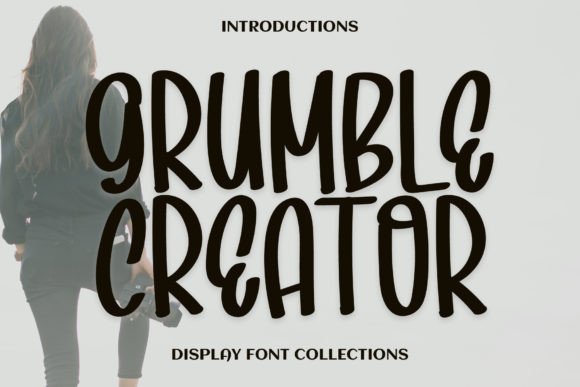
At its heart, Grumble Creator is a delightful display font brimming with charm and whimsy. Its playful curves and friendly demeanor evoke a sense of camaraderie and joy that’s hard to fake. Unlike rigid, geometric sans serifs or overly formal scripts, this typeface has a human touch. The letters feel like they were drawn with a smile, featuring soft, rounded edges and a subtle bounce that keeps the eye moving happily across the page. It’s the kind of creative font that doesn’t just spell out words—it communicates a feeling. This makes it a powerful tool for anyone looking to inject warmth and approachability into their visual communication.
Where Grumble Creator Truly Shines: Real-World Applications
Theory is nice, but let’s talk practicality. Where does a font with this much personality actually work? The answer might surprise you with its versatility.
For the Brand Builder
If you’re crafting a brand identity for a bakery, a children’s boutique, a pet grooming service, or a community-focused startup, Grumble Creator can become your secret weapon. Imagine it on your logo, instantly conveying approachability and fun. It helps build immediate brand recognition because the font itself is memorable. Use it for your brand’s tagline, on packaging for artisanal goods, or across all your marketing assets to create a cohesive, joyful story that customers connect with emotionally.
For the Digital Creator & Marketer
In the crowded space of social media graphics, standing out is everything. Grumble Creator is perfect for Instagram quotes, YouTube thumbnails, Pinterest pins, or Facebook event banners. Its inherent charm stops the scroll. For blog headers or featured images, it sets a welcoming tone before a reader even scans the first paragraph. It’s also fantastic for designing digital products like printable planners, worksheets, or e-book covers where a friendly, handcrafted feel is desired.
For Print & Physical Goods
Don’t limit its magic to the screen. This premium font shines in print materials too. Think party invitations that get guests excited, cheerful posters for a local fair, or eye-catching packaging design for small-batch products. It’s also ideal for merchandise like t-shirts, tote bags, or mugs where a quirky, positive message is key. The font’s clarity at larger sizes ensures it remains impactful and readable even when printed.
Pairing Grumble Creator with Other Fonts: A Practical Guide
Using a bold display font like Grumble Creator everywhere can overwhelm a design. The real magic happens in the pairing. Here’s a simple framework to follow:
- The Classic Combo: Pair Grumble Creator (for headlines or short bursts of text) with a clean, neutral sans serif font for body copy. Think Montserrat, Lato, or Open Sans. The contrast lets the display font’s personality pop while keeping longer text highly readable.
- The Modern Twist: For a more contemporary feel, try it with a geometric sans serif like Futura or Avenir. This creates a dynamic tension between playful and precise.
- The Whimsical Duo: If your project is all about playfulness, you could pair it with a simple, rounded script font or a complementary handwritten font, but use this sparingly for maximum effect.
The golden rule? Always test your font pairings in context. Mock up a headline and a paragraph of body copy. See how they interact on a poster layout versus a mobile screen. Good pairing enhances visual consistency and guides the viewer’s eye naturally.
Key Considerations Before You Dive In
Before you download and go wild, a couple of practical points will ensure success.
First, review the included font styles. Does the family come with different weights (Light, Regular, Bold) or stylistic alternates? Knowing what’s in the toolbox lets you create more nuanced designs. Second, readability considerations are non-negotiable. While Grumble Creator is designed for clarity at display sizes, it’s not meant for long-form body text. Use it strategically for impact, and pair it with a workhorse font for the reading-heavy parts. Finally, for any commercial project, always verify the commercial licensing terms. Ensure the license covers your intended use, whether for a client’s logo, printed merchandise, or a digital product you sell.
Bringing It All Together
Choosing a typeface is a strategic decision. It’s not just about what looks cool in a font preview; it’s about what serves your project’s goals and speaks to your audience. Grumble Creator is a design asset that does more than decorate—it communicates. It tells your audience, “Hey, we’re friendly, we’re fun, and we care about the details.”
So, if you’re working on a project that needs a dose of authenticity and joy, give this creative font a try. Experiment with it in a logo design, see how it transforms a simple social media post, or use it to give your editorial layout a unique voice. Sometimes, the right font isn’t the most serious one—it’s the one that makes people feel something. And that’s exactly what Grumble Creator does best.